
Budgett Web, Explained
Budgett Web is your whole money picture on a computer. Here's the Home page, part by part. The numbers in the picture are sample numbers.
Budgett Web Home
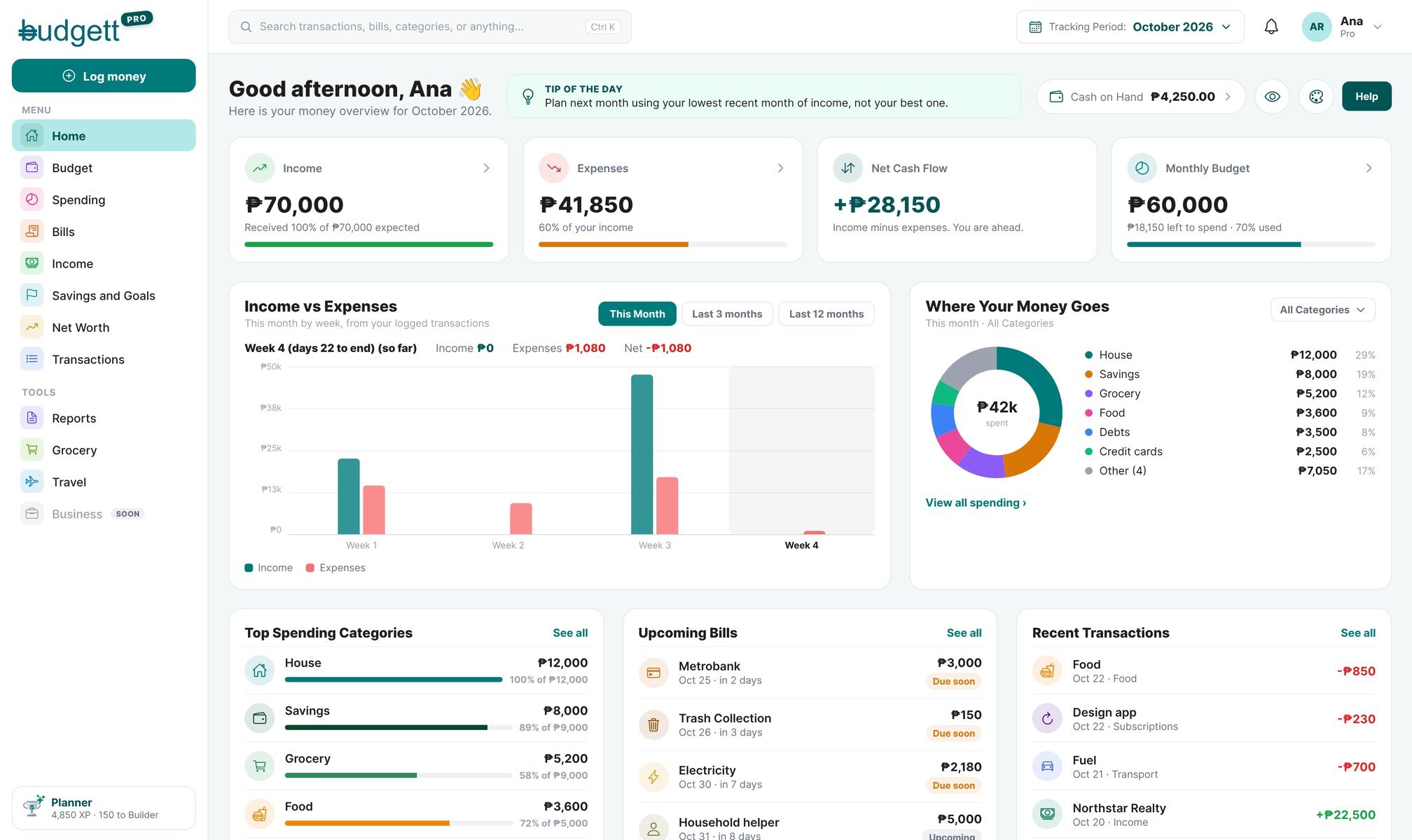
- 1Log money
Log an expense, income, transfer, or loan from any page.
Read: The Calculator, Explained → - 2Menu
Home, Budget, Spending, Bills, Income, Savings and Goals, Net Worth, and Transactions, each laid out wide.
- 3Tools
Reports (Financial and Debt, by month or year, to download or print), the Grocery dashboard, and the Travel dashboard.
Read: Budgett Reports: Financial, Debt and XP → - 4Your rank
Your rank and XP.
Read: How Budgett XP and Ranking works → - 5Search
Find anything: pages, categories, bills, savings, or transactions. Press Ctrl + K (or ⌘ K on a Mac).
- 6Tracking Period
Switch months. From the 16th, plan next month here.
Read: Planning your budget for next month → - 7Updates and your account
The bell shows Budgett updates. Your name opens your Profile and Log out.
- 8Tip of the day
A short money tip that changes every day.
- 9Cash on Hand
The cash in your wallet. Click it to Cash In or see cash expenses.
Read: Savings Accounts, Cash on Hand and Transfers → - 10Hide, color, Help
The eye hides your amounts. The palette changes your color. Help reaches Budgett Support.
- 11Your number cards
Income, Expenses, Net Cash Flow (income minus expenses), and Monthly Budget. Click one to open it.
- 12Income vs Expenses
This month by week, or the last 3 or 12 months.
- 13Where Your Money Goes
Your spending by category. Use the menu to show only Essentials, Lifestyle, or Financial categories.
- 14Top Spending Categories
Your biggest categories, with how much of each budget is used.
Read: Understanding Your Expenses → - 15Upcoming Bills
What's due next, with how many days are left.
Read: How to Manage Your Bills → - 16Recent Transactions
Your latest entries. See all opens the Transactions table.
Read: Finding and Fixing Transactions →
Who Can Use It
Budgett Web is for Pro members. Log in at app.usebudgett.com with the same email and password you use in the app.
On your computer, open app.usebudgett.com and press Ctrl + K. Type a bill name and jump straight to it.
More guides
What's in Your Profile
A picture tour of Profile: every row, what it does, and which plan has it.
Managing Your Account
Devices, fingerprint lock, passcode, password, security questions, and deleting your account.
Make Budgett Yours
Your app color, your Home screen cards, shortcuts, and your Display Name.