
Your Bills Tab, Explained
The Bills tab is your bill checklist for the month. Here's every part of it. The numbers in the picture are sample numbers.
The Bill List
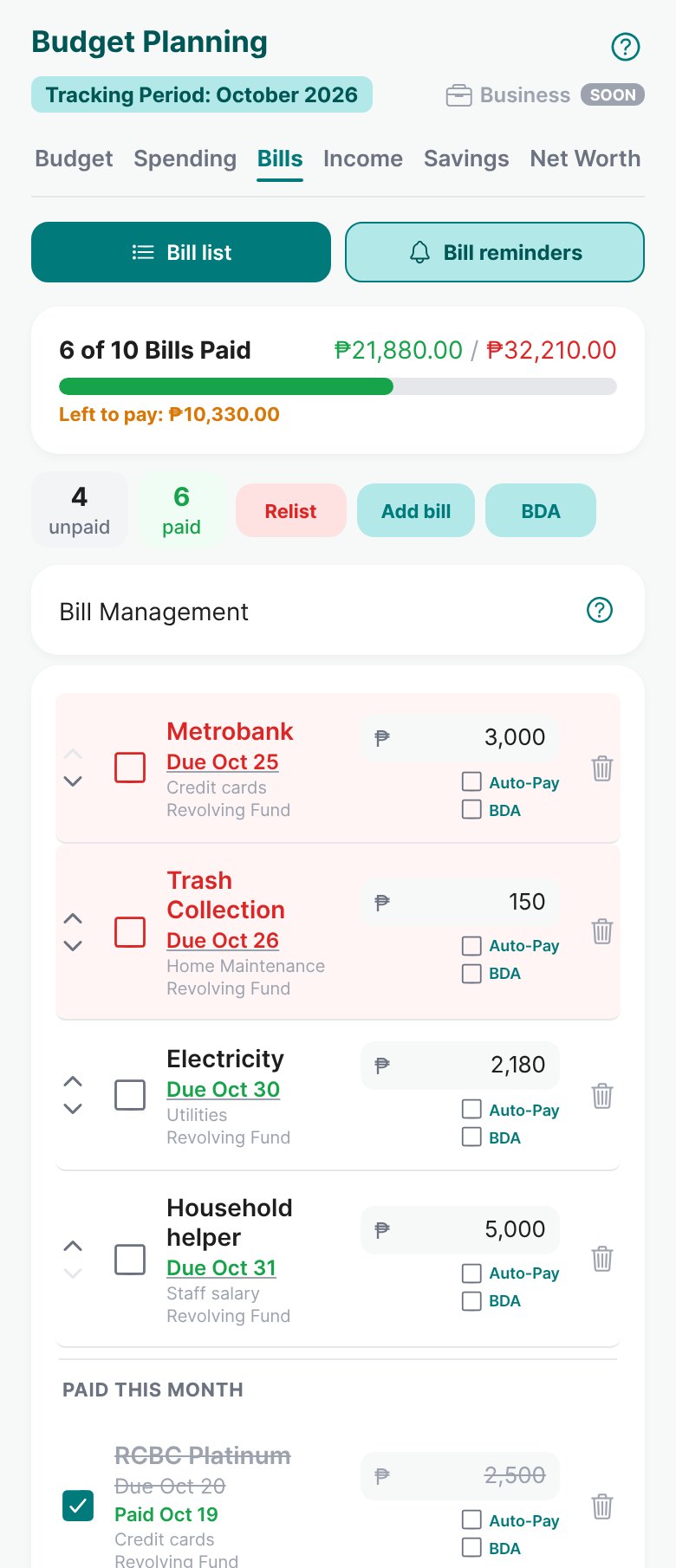
- 1Bill list and Bill reminders
Switch between your bills and the reminder settings for each one.
Read: Reminders, Auto Pay and Bill Date Automation → - 2Bills paid
How many bills you've paid, how much, and how much is left to pay this month.
- 3Unpaid and paid
Quick counts of what's still to pay and what's done.
- 4Relist
At the start of a new month, sets the next due date for your paid bills in one tap.
Read: Reminders, Auto Pay and Bill Date Automation → - 5Add bill
Add a new bill with its amount and due date.
- 6BDA
Bill Date Automation: moves due dates forward by themselves, bill by bill.
Read: Reminders, Auto Pay and Bill Date Automation → - 7Bill Management help
A short explanation of how bills work, with a link to the full guide.
Read: How to Manage Your Bills → - 8Due soon
Bills due soon turn red, so you see them first. The arrows move a bill up or down in your list.
- 9The checkbox
Tick it when you pay. It marks the bill paid, logs the expense, and takes the money from its funding source.
Read: How to Manage Your Bills → - 10Amount
The bill's amount this month. Change it before you tick it paid if it's different this time.
- 11Auto-Pay and BDA
Tick Auto-Pay so the bill pays itself when due (Plus and Pro). Tick BDA so its due date moves forward by itself.
Read: Reminders, Auto Pay and Bill Date Automation → - 12Paid this month
Bills you've paid, with the date you paid them.
Open Bills and look at the red ones. Pay or plan for them today, before they're late.
More guides
Tracking Debts and Payment Plans
Track loans, cards, and installments month by month, and pay cards without counting twice.
Credit Cards in Budgett
Card bills that build themselves as you swipe, paying without counting twice, and Credit Card Filters.
Savings Accounts, Cash on Hand and Transfers
Track your banks, e-wallets, and wallet cash, and move money between them the right way.